
Progression and Loadout Changes
Applies to The Loopler version 1.0.2. You can make the numbers explode, fill the XP bar, and still meet a padlock at track selection. The game tracks several kinds of progress separately. Profile XP moves the account’s Unlocks tree, while clear achievements record wins with particular cars, tracks, and difficulty tiers. One run can move both, but they are not the same counter. Always read the written requirement in the current menu instead of guessing from a neighboring node or its color.
What version 1.0.2 changed
| System | Version 1.0.2 behavior |
|---|---|
| Profile XP | Rounds completed now carry more weight when XP is awarded. |
| Unlock cadence | More new mechanics arrive earlier in the profile progression. |
| Unlock notification | The extra popup that appeared when the XP bar finished filling was removed. Open Unlocks after leveling to inspect the new branch yourself. |
| Loadout lesson | A one-time tutorial appears when you enter track selection after unlocking Loadout. |
| Loadout display | Card and gate numbers in Loadout no longer keep scaling from the previous run. |
The Infinity track and the end-of-run choice to continue into Infinity are separate. In version 1.0.2, beating any run unlocks that continuation choice across the account; you no longer need a win on each individual track. If you want the completed run’s score submitted to the normal leaderboard, choose Settle. Continuing into Infinity follows its own score path.
How to read Unlocks and Loadout
| State | What it means |
|---|---|
| Locked | The tooltip still gives an unlock requirement. The component cannot be enabled yet. |
| Available but inactive | Your profile has earned the component, but it is not enabled for the normal offer pool. |
| Active | The Loadout tooltip marks the component ACTIVE. It is eligible to appear in future offers. |
Version 1.0.2 also includes the earlier fix that automatically adds newly unlocked cards, gates, and charms to Loadout. Check the written ACTIVE state before starting a planned engine anyway. Active means the item may appear; it does not promise a draw. The RNG is still free to inspect your perfect Ghost plan and hand you a small museum of unrelated machinery.
Use Loadout as a pool filter. Enable the fuel support, scoring line, gates, and charms that serve the same trigger chain. Leave unrelated families inactive when they would only crowd the offers. That gives the tiny car a cleaner route from modest loop to runaway number machine.
Track Layout Reference
These nine track silhouettes help match the layout to the track name. They are game art from version 1.0.1 and show the shape, without placed gates, travel direction, hazards, or unlock requirements. Use the current track card for access rules and Inspect Track for your actual run.
| Track shape | Track |
|---|---|
 | Donut |
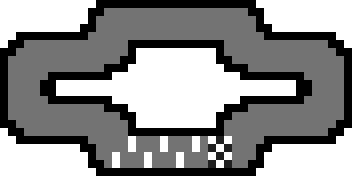 | Hotdog |
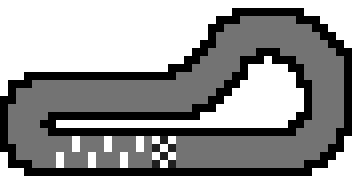 | Whistle |
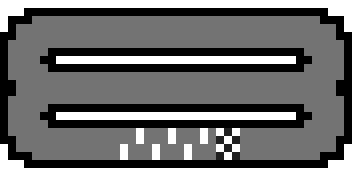 | Burger |
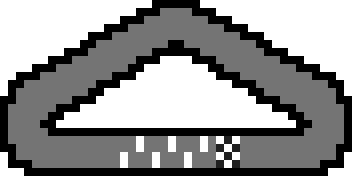 | Triangle |
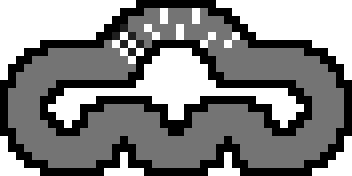 | Mheep |
 | Infinity |
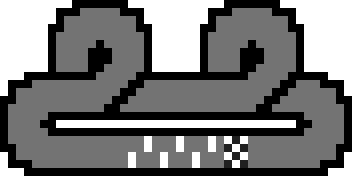 | Whirl |
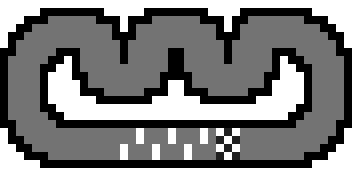 | Crown |
Infinity track and Infinity continuation are separate. Selecting the Infinity layout does not prove that a completed run has reached Infinity mode. Use the continuation and readiness rules for that decision. For gate ordering on any layout, number slots in travel order.
Comments will load when you reach this part of the walkthrough.