
How to Manage Cashflow, Orders, and Penalties
It is easy to talk yourself into one more order in Retro Rewind - Video Store Simulator when the returns rack is full, the NEW tab is glowing on the office computer, and the Tape Dealer is whispering about half-price bootlegs in the alley. That is how a stable day turns into a cash crunch. The trick is not just spending less. It is understanding which orders the game is actually rewarding, which penalties will follow you into checkout, and which lucky windfalls are too random to build a plan around.
The packaged text is unusually useful here. It confirms that new releases stay especially popular for 7 days, that ordering 5 copies or more in one transaction can unlock a free standee and a better unit price, and that the Tape Dealer appears every Tuesday and Thursday at 9 PM with bootlegs, exclusive adult titles, and occasional holographic rarities. That gives you a much cleaner budget rule: buy with timing and purpose, not because the catalog is tempting.
What is confirmed
- New releases have a timed popularity window. The game says they count as new for 7 days, making them especially popular during that stretch.
- The 5-copy new-release bundle is real. Ordering 5 or more copies in one transaction gets you the standee bundle, and the packaged tutorial text also says the price per unit decreases as you add copies.
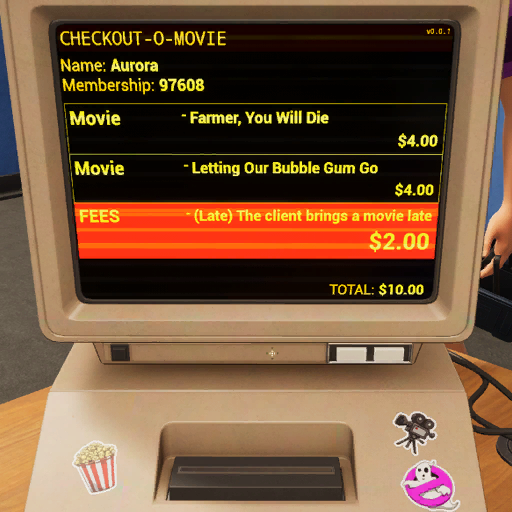
- Late and broken returns become checkout fees. The system adds them automatically to the customer?s membership ID, and the checkout computer flags them next time the customer buys something.
- You can choose whether to charge or waive some fees. The readable dialogue confirms both charge-fee and remove-fee responses, which means penalties are not just passive bookkeeping.
- The Tape Dealer has a real schedule and value proposition. The quest text says he sells bootleg movies for half their market value, plus exclusive adult titles and occasional holographic rarities, on Tuesday and Thursday nights.
- Task rewards and random calls can help, but they are not a plan. The calendar has extra task rewards, and phone events can sometimes deliver donations, refunds, grants, or free movie drops. Those are welcome, but too inconsistent to treat as core income.
Best cashflow advice once you know those rules
- Protect a cash buffer before shopping for flavor. Stable restocks beat one exciting order that leaves you broke.
- Use the 5-copy new-release bundle only when you can exploit the full 7-day window. If traffic, event demand, or your layout is not ready, the standee is not enough reason to force the order.
- Time deep buys around the calendar. A new release or event-aligned genre is where larger orders make the most sense.
- Treat the Tape Dealer like a tactical source, not a budgeting replacement. Half-price stock is great, but random rare picks and bootlegs do not replace dependable shelf planning.
- Do not let fee problems pile up mentally. Late and broken returns will resurface at checkout, so penalty decisions are really customer-flow decisions too.
How to think about penalties without overdramatizing them
- Broken returns cost more than the tape. A damaged rental has to be trashed, then the customer dispute comes later.
- Late fees are part of store policy, not free money. Some customers pay quietly, some complain, and some threaten to stop coming back.
- Waiving fees buys goodwill, but it is still a choice with a cost. The game clearly supports both strict and lenient responses, so use that discretion where it actually helps.
Code Analysis Hints and practical takeaways
- Featured inventory systems matter more over time. The game files show dedicated systems for new-release shelves, movie displays, standees, Staff Picks, and the Clearance Bin. That suggests smart cashflow eventually includes where you present tapes, not only what you buy.
- The Clearance Bin is clearly progression content, but its exact economics are not exposed in readable text yet. I would treat it as a likely tool for stale stock management, but not claim a specific profit formula until we can verify it.
- Black Market inventory is attractive because the purchase price is explicit. What remains less clear from readable files is the exact long-term downside of leaning too hard on low-quality or bootleg inventory, beyond customer complaints and quality-flavored dialogue.
Transparent take: what I would actually trust when spending
Trust completely: new releases have a 7-day popularity window, the 5-copy bundle gives a standee and better pricing, late and broken returns create fee events, and the Tape Dealer appears Tuesday and Thursday at 9 PM.
Use with confidence, but not as exact math: charge fees when cash is tight and the customer relationship does not matter much; be more flexible when you are protecting flow, reputation, or a repeat renter during a stable period.
Treat as informed but not fully solved: later cashflow tools like the Clearance Bin and other featured-display systems. The game clearly has them, but the exact money logic is not fully exposed in readable text yet.
The safest budget rhythm in Retro Rewind - Video Store Simulator is simple: restock your dependable renters, read the calendar, use bundle buys when the timing is actually good, and do not confuse random lucky phone calls with a business model. Once that clicks, orders stop feeling impulsive and penalties stop feeling personal. They become part of a system you can actually manage.
Comments will load when you reach this part of the walkthrough.